

When working with fractions, sums, or multiline equations, normal parentheses or brackets may not fit the expression height. This creates formatting problems in mathematical documents.
Fortunately, LaTeX has built-in commands to produce properly sized delimiters.
Table of Contents
Default delimiter symbols
LaTeX provides several common delimiters such as parentheses, square brackets, curly braces, and angle brackets. These symbols work well for short mathematical expressions.
\documentclass{article}
\begin{document}
   \[ (a), [b], \{c\}, \langle d \rangle \]
   \[ (\frac{X_i}{K_1}) \]
   \[ \sum_{i=1}^n [\frac{x}{y_n}] \]
   \[ \{ \frac{1}{2}, \frac{1}{3}, \frac{1}{4}, \dots \} \]
   \[ \langle \frac{2}{3}, \frac{3}{4} \rangle \]
\end{document}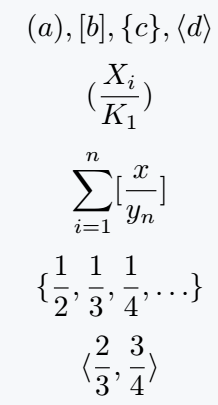
These symbols are inserted directly in math mode. However, the delimiter size does not change automatically when the expression becomes taller or more complex.
Automatic scaling with left and right
For larger mathematical structures, it is better to use \left and \right. These commands automatically adjust the delimiter size based on the height of the expression.
\documentclass{article}
\begin{document}
   \[ \left(\frac{X_i}{K_1}\right) \]
   \[ \sum_{i=1}^n \left[\frac{x}{y_n}\right] \]
   \[ \left\{ \frac{1}{2}, \frac{1}{3}, \frac{1}{4}, \dots \right\} \]
   \[ \left\langle \frac{2}{3}, \frac{3}{4} \right\rangle \]
\end{document}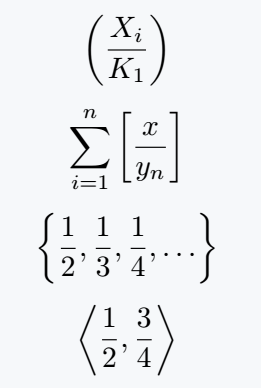
This approach is the most common way to create big brackets in LaTeX because the size adapts automatically.
Creating reusable delimiter macros
If you frequently use scalable delimiters, writing the full syntax every time can feel repetitive. A better approach is defining small macros.
\newcommand\name[1]{definition}
-
\newcommandDefines a custom command in the document preamble.
-
\nameThe name you assign to the new macro.
-
[1]Indicates that the command takes one argument.
-
#1Represents the argument passed into the command.
\documentclass{article}
\newcommand\Pb[1]{\left(#1\right)}
\newcommand\Sb[1]{\left[#1\right]}
\newcommand\Cb[1]{\left\{#1\right\}}
\newcommand\Lb[1]{\left\langle#1\right\rangle}
\begin{document}
   \[ \Pb{\frac{X_i}{K_1}} \]
   \[ \sum_{i=1}^n \Sb{\frac{x}{y_n}} \]
   \[ \Cb{\frac{1}{2}, \frac{1}{3}, \frac{1}{4}, \dots} \]
   \[ \Lb{\frac{1}{2}, \frac{3}{4}} \]
\end{document}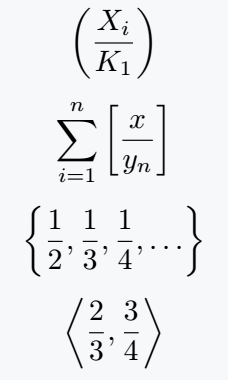
Macros improve readability and make it easier to insert consistent grouping symbols throughout the document.
Manual size control with big commands
Sometimes automatic scaling may not produce the exact visual size you want. In that case, LaTeX offers manual size commands.
These commands allow you to control the delimiter size directly.
\documentclass{article}
\begin{document}
   \[ \big(\frac{a_1}{k}\big), \Big(\frac{a_2}{k}\Big), \bigg(\frac{a_3}{k}\bigg), \Bigg(\frac{a_4}{k}\Bigg) \]
   \[ \big[\frac{b_1}{k}\big], \Big[\frac{b_2}{k}\Big], \bigg[\frac{b_3}{k}\bigg], \Bigg[\frac{b_4}{k}\Bigg] \]
   \[ \big\{\frac{c_1}{k}\big\}, \Big\{\frac{c_2}{k}\Big\}, \bigg\{\frac{c_3}{k}\bigg\}, \Bigg\{\frac{c_4}{k}\Bigg\} \]
   \[ \big\langle\frac{d_1}{k}\big\rangle, \Big\langle\frac{d_2}{k}\Big\rangle, \bigg\langle\frac{d_3}{k}\bigg\rangle, \Bigg\langle\frac{d_4}{k}\Bigg\rangle \]
\end{document}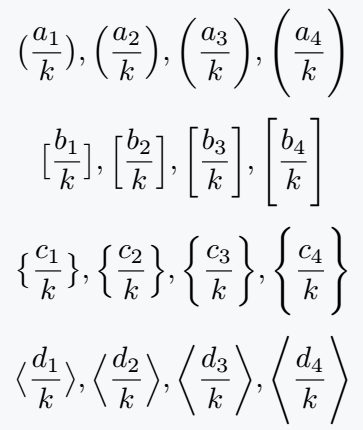
Large delimiters in multiline equations
When writing multi-line formulas with environments such as align, scalable delimiters must appear in pairs. If a symbol spans multiple lines, an invisible placeholder must be used.
\documentclass{article}
\usepackage{amsmath}
\begin{document}
 \begin{align*}
    f(x) = a_0 + \sum_{n=1}^\infty & \left( a_n\cos\frac{n\pi x}{L} \right. \\
    &\left. + b_n\sin\frac{n\pi x}{L} \right)
 \end{align*}
 \begin{align*}
    f(n) =  & \left[\frac{1}{2} + \frac{1}{3} +\frac{1}{4} \right. \\
    &\left. + \frac{1}{5} + \cdots + \frac{1}{n} \right]
 \end{align*}
 \begin{align*}
    S_n =  & \left\{\frac{1}{a_1}, \frac{1}{a_2}, \frac{1}{a_3}, \right. \\
    &\left. \frac{1}{a_4} + \cdots + \frac{1}{a_n} \right\}
 \end{align*}
\end{document}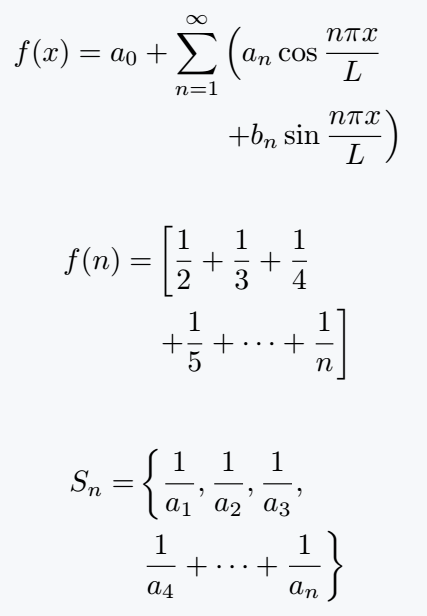
The commands \left. or \right. create invisible delimiters so LaTeX maintains proper pairing.
Using physics package delimiter commands
The physics package simplifies scalable delimiters using the \qty command. It automatically produces appropriately sized parentheses or braces.
\qty(delimiter expression)
\documentclass{article}
\usepackage{physics}
\begin{document}
  \[ \phi = a\cos \qty(\cos\qty(\frac{2\pi t+\phi}{A})A-2\pi ft) \]
  \[ \tan^{-1}\qty[\frac{2\qty[\frac{1-x}{1+x}]}{1-\qty[\frac{1-x}{1+x}]^2}] \]
  \[ \vb{Q} = \qty{\frac{a}{b}|a,b \; \epsilon \; \vb{Z}, b\neq 0} \]
\end{document}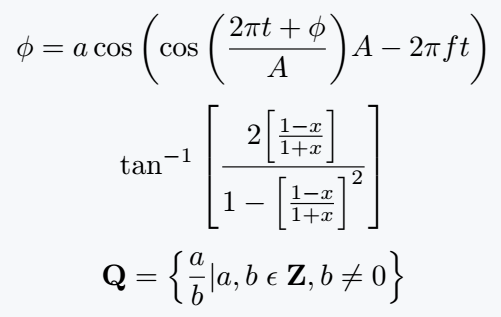
This method is especially popular in physics and engineering documents because it keeps complex expressions concise.
Best Practice
Use \left and \right for most equations because they scale naturally with the expression.
If you work with complex formulas regularly, the physics package can simplify delimiter handling.
FAQs
How do you make big brackets in LaTeX?
Use \left and \right commands in math mode. These automatically adjust bracket size based on the expression.
What is the difference between \left and \big in LaTeX?
\left and \right scale brackets automatically, while \big, \Big, \bigg, and \Bigg set the bracket size manually.
How do you use large delimiters in multiline equations in LaTeX?
Use invisible delimiters like \left. or \right. to maintain proper delimiter pairing across multiple lines.


Jidan
LaTeX enthusiast and physics educator who enjoys explaining mathematical typesetting and scientific writing in a simple way. Writes tutorials to help students and beginners understand LaTeX more easily.