

The norm symbol is widely used in linear algebra, functional analysis, and physics.
In LaTeX there are several ways to typeset norms, but many beginners face issues because the double bar does not always scale properly with the size of the expression.
Table of Contents
This tutorial covers the most reliable methods to write the norm symbol in LaTeX with syntax, examples, and best practices.
Using double vertical bars
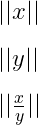
The most basic way to write the norm is by typing two vertical bars directly from the keyboard around an expression. This approach is simple but the size remains fixed.
\[ || x || \]
\[ || x^{2} || \]
\[ || \frac{x}{y} || \]
Output :
Using the backslash command
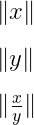
LaTeX also provides the command \| ... \| which produces the same double bar effect as typing vertical bars directly.
\[ \| x \| \]
\[ \| y \| \]
\[ \| \frac{x}{y} \| \]
Output :
Using Vert, lVert and rVert
The commands \Vert, \lVert, and \rVert from amsmath provide proper upright vertical bars.
They are case sensitive and recommended over plain keyboard bars.
\[ \Vert x \Vert \]
\[ \lVert y \rVert \]
\[ \lVert \frac{x}{y} \rVert \]
Output :
Defining custom commands
Writing the full syntax repeatedly can be tedious. A better solution is to define a custom command with \newcommand.
This makes the code shorter and more consistent.
\newcommand\nm[1]{\lVert #1 \rVert}
\newcommand\nmx[1]{\Vert #1 \Vert}
\newcommand\nm[1]{\lVert #1 \rVert}- This defines a custom command
\nmthat automatically wraps its argument between left and right double bars. \newcommand\nmx[1]{\Vert #1 \Vert}- This defines another command
\nmxusing\Vertfor the same effect.
\documentclass{article}
\usepackage{amsmath}
\newcommand\nm[1]{\lVert #1 \rVert}
\newcommand\nmx[1]{\Vert #1 \Vert}
\begin{document}
  \[ \nm{x} \]
  \[ \nmx{y} \]
  \[ \nmx{\frac{x}{y}} \]
\end{document}
Output :
Adjustable size with \left and \right
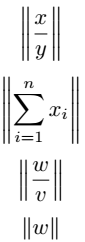
By default norm symbols remain fixed in size. To make them adjust automatically to the content, use \left and \right with the vertical bar commands.
\left\lVert \frac{x}{y} \right\rVert
\left\lVert \sum_{i=1}^{n} x_{i} \right\rVert
\left\Vert w \right\Vert
\documentclass{article}
\usepackage{amsmath}
\begin{document}
  \[ \left\lVert \frac{x}{y} \right\rVert \]
  \[ \left\lVert \sum_{i=1}^{n} x_{i} \right\rVert \]
  \[ \left\Vert w \right\Vert \]
\end{document}
Output :
Using the physics package
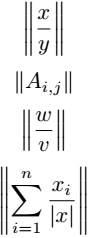
The physics package provides a built-in \norm command which automatically scales with the expression.
It also supports manual sizing with \big, \Big, \bigg, and \Bigg.
\documentclass{article}
\usepackage{physics}
\begin{document}
 \[ \norm{\frac{x}{y}} \]
 \[ \norm{A_{i,j}} \]
 \[ \norm{\frac{w}{v}} \]
 \[ \norm{\sum_{i=1}^{n}\frac{x_i}{\abs{x}}} \]
\end{document}
Output :
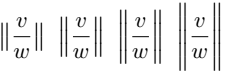
You can use four different big commands with the norm command to adjust the symbol’s size as needed.
\documentclass{article}
\usepackage{physics}
\begin{document}
 \[ \norm\big{\frac{v}{w}} \; \norm\Big{\frac{v}{w}} \; \norm\bigg{\frac{v}{w}} \; \norm\Bigg{\frac{v}{w}} \]
\end{document}
Output :
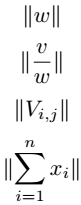
If you want a norm symbol with a fixed size, add an asterisk (*) to the command, like \norm*.
\documentclass{article}
\usepackage{physics}
\begin{document}
  \[ \norm*{w} \]
  \[ \norm*{\frac{v}{w}} \]
  \[ \norm*{V_{i,j}} \]
  \[ \norm*{\sum_{i=1}^{n}x_{i}} \]
\end{document}
Output :
Using mathtools package
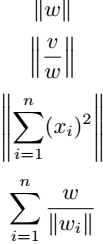
The mathtools package allows defining custom paired delimiters using \DeclarePairedDelimiter. Adding a star ensures automatic scaling.
\nm{}
\nm*{}
\DeclarePairedDelimiter\nm{\lVert}{\rVert}- This defines a custom paired delimiter called
\nmwhich uses left and right vertical bars. Adding a star makes the size dynamic.
\documentclass{article}
\usepackage{mathtools}
\DeclarePairedDelimiter\nm{\lVert}{\rVert}
\begin{document}
 \[ \nm*{w} \]
 \[ \nm*{\frac{v}{w}} \]
 \[ \nm*{\sum_{i=1}^{n}(x_{i})^2} \]
 \[ \sum_{i=1}^{n}\frac{w}{\nm*{w_i}} \]
\end{document}
Output :
Norm of vectors
The norm symbol is often used in vector mathematics to define magnitude and unit vectors. Combining with \vec and \abs gives professional results.
\documentclass{article}
\usepackage{physics,amsmath}
\begin{document}
 \[ \norm{k\vec{a}}=\abs{k}\norm{\vec{a}} \]
 \[ \vu*{a}=\frac{\vec{a}}{\norm{\vec{a}}} \]
 \[ \norm{\vec{u}} = \sqrt{u^2_1 + u^2_2 + \cdots + u^2_n} \]
\end{document}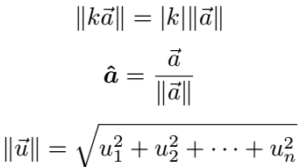
FAQs
How do you write the norm symbol in LaTeX?
The norm symbol in LaTeX can be written using commands like \lVert x \rVert, ||x||, or the \norm command from the physics package.
What is the best way to write vector norms in LaTeX?
The recommended method is using \lVert and \rVert from the amsmath package because they create proper mathematical delimiters.
How do you make norm symbols scale automatically in LaTeX?
You can use \left\lVert and \right\rVert or define paired delimiters using the mathtools package to automatically adjust the size of the norm symbol.
Best Practice
1. For quick usage the \lVert and \rVert commands are reliable.
2. To make the norm symbol scale automatically always use \left ... \right or define paired delimiters.
3. For professional documents the physics package is highly recommended since it provides a clean \norm command with built-in sizing options.
4. If you want full customization use mathtools with \DeclarePairedDelimiter.
This way your documents remain consistent and easier to maintain.


Jidan
LaTeX enthusiast and physics educator who enjoys explaining mathematical typesetting and scientific writing in a simple way. Writes tutorials to help students and beginners understand LaTeX more easily.