

When writing mathematical expressions in physics or engineering documents, vectors are often represented in bold format instead of using arrow notation.
However, many LaTeX beginners are unsure how to correctly create bold vectors in math mode. Some use \vec for arrows, while others attempt \textbf, which is primarily intended for text formatting.
Table of Contents
In this tutorial, you will learn several correct methods to write bold vectors in LaTeX, including built-in commands and useful packages that simplify vector notation.
Using \mathbf Command for Bold Vectors
The most common way to make vector variables bold in LaTeX is the \mathbf command.
This command works in math mode and converts mathematical variables into bold symbols.
\documentclass{article}
\begin{document}
  \[ \hat{r} = \frac{\mathbfbf{r}}{\mid\textbf{r}\mid} \]
  \[ \mathbf{r} = \mid\mathbf{r}\mid\hat{r} \]
\end{document}
Output :

Writing Bold Greek Vector Symbols
Sometimes vectors are represented using Greek letters, such as θ, ω, or α. The \mathbf command does not work properly with Greek symbols.
In these cases, you should use the \boldsymbol command from the amsmath package.
\documentclass{article}
\usepackage{amsmath}
\begin{document}
  \[ \boldsymbol{\theta} \, \boldsymbol{\omega} \, \boldsymbol{\alpha} \]
\end{document}
Using the Physics Package for Bold Vectors
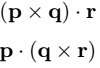
If you frequently write physics equations, the physics package provides a convenient command for bold vectors.
The package includes the \vb command, which automatically converts a symbol into a bold vector.
\documentclass{article}
\usepackage{physics,amsmath}
\begin{document}
  \[ \vectorbold{(p \times q)\cdot r} \]
  \[ \vb{p \cdot (q \times r)} \]
\end{document}
Output :
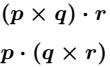
However, if you add a star(*) symbol with the \vb command, the text font style will be converted to italic. For example
\documentclass{article}
\usepackage{physics,amsmath}
\begin{document}
  \[ \vectorbold*{(p \times q)\cdot r} \]
  \[ \vb*{p \cdot (q \times r)} \]
\end{document}
Output :
Using Arrow Notation Together with Bold Vectors
In some teaching materials, both arrow notation and bold formatting are used together to highlight vectors
\documentclass{article}
\usepackage{physics}
\begin{document}
  \[ \vectorbold*{\va{r}} \]
  \[ \vb*{\va{\theta}} \]
  \[ \vb*{\vu{r},\vb{\theta}} \]
\end{document}
Output :
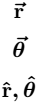
Although this style is not always necessary, it can help emphasize vector quantities in certain cases.
FAQs
How do you write a bold vector in LaTeX?
You can write a bold vector in LaTeX using the \mathbf command inside math mode. For example, \mathbf{v}
What is the difference between \mathbf and \textbf in LaTeX?
\mathbf is used for bold mathematical symbols in math mode, while \textbf is mainly used to make normal text bold.
How do you make Greek letters bold in LaTeX?
To make Greek letters bold in LaTeX, use the \boldsymbol command from the amsmath package. For example, \boldsymbol{\theta}
Conclusion
Bold vectors are commonly used in scientific writing to distinguish vector quantities from scalars.
In LaTeX, the \mathbf command is the most common way to format vector variables in bold, while \boldsymbol is useful for Greek symbols.
For physics-related equations, the physics package provides convenient commands like \vb to simplify vector formatting.


Jidan
LaTeX enthusiast and physics educator who enjoys explaining mathematical typesetting and scientific writing in a simple way. Writes tutorials to help students and beginners understand LaTeX more easily.