

Adding multiple author in LaTeX is very common in academic writing. Here we will explain multiple author in LaTeX in a very simple and clear way so everything feels easy to understand.
Basic author command
If your document is simple and you just need to show a few names on the title page, the default \author{} command is more than enough.
\author{..... \and ...... \and ......}
This method is clean, minimal, and perfect for assignments, reports, or class projects. You do not need any extra package here.
\documentclass{article}

\title{Sample Paper}
\author{Alice Smith \and Bob Johnson \and Carol Lee}
\date{\today}

\begin{document}
\maketitle

\end{document}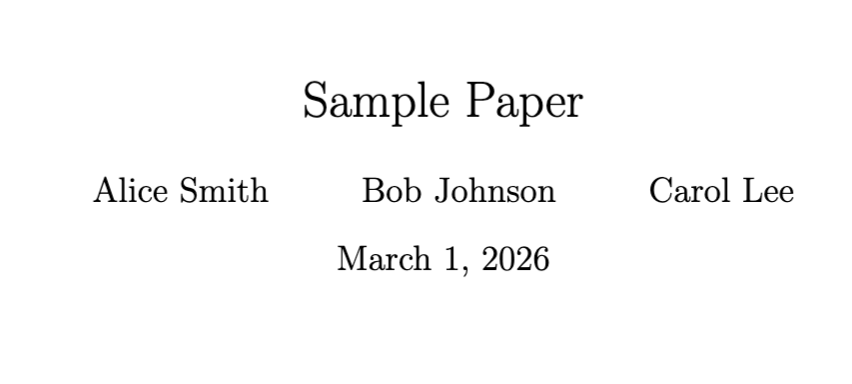
Here, the \and command separates each author. It is automatic and easy to manage.
However, this method does not handle detailed affiliation very well.
Manual affiliation formatting
Sometimes you want each author’s department or email address to appear just below their name.
In that case, you can manually control the layout using line breaks.
\author{
Author Name \\
Department Name \\
Email Address
\and
Author Name \\
Department Name \\
Email Address
}
-
\author{...}This command stores all author related information. Whatever you write inside the braces will appear when
\maketitleis used. -
\\This creates a line break. It allows you to place the department and email under the author name in a neat vertical structure.
-
\andThis separates one author block from another. LaTeX automatically adjusts spacing between them. It keeps each author’s details grouped together.
\documentclass{article}

\title{Research Report}

\author{
Alice Smith \\
Department of Mathematics \\
[email protected]
\and
Bob Johnson \\
Department of Physics \\
[email protected]
}

\date{}

\begin{document}
\maketitle

\end{document}
It works well for small to medium projects, though it may require manual adjustment for complex formatting.
Using authblk package
When writing a serious research paper, especially with shared affiliations, using the authblk package makes life much easier.
It keeps everything structured and automatically links authors to their institutions. This is a very practical way to handle multiple author in LaTeX.
\usepackage{authblk}

\author[1]{Author Name}
\author[2]{Author Name}
\affil[1]{Affiliation One}
\affil[2]{Affiliation Two}
-
\usepackage{authblk}This package extends the default author system. It manages numbering and formatting of affiliations automatically. It is especially helpful when many authors share the same institution.
-
\author[1]{Name}The number inside the square brackets connects the author to a specific affiliation. If multiple authors use the same number, they will share that institution.
-
\affil[1]{Affiliation}This defines the institution name that corresponds to the number. LaTeX will match authors and affiliations automatically. It reduces manual formatting errors.
\documentclass{article}
\usepackage{authblk}

\title{Advanced Research Paper}

\author[1]{Alice Smith}
\author[1]{Bob Johnson}
\author[2]{Carol Lee}

\affil[1]{Department of Mathematics, XYZ University}
\affil[2]{Department of Computer Science, ABC University}

\date{}

\begin{document}
\maketitle

\end{document}
IEEE style formatting
Conference papers often require strict formatting rules. If you are using the IEEEtran document class, you must follow its structured author format.
\documentclass{IEEEtran}

\author{
\IEEEauthorblockN{Author Name}
\IEEEauthorblockA{Affiliation \\
Email}
}
-
\IEEEauthorblockN{}This command prints the author name in IEEE format. It is specially designed for conference papers. You can include multiple names inside separate blocks.
-
\IEEEauthorblockA{}This defines affiliation and contact details. It appears directly under the corresponding author name.
\documentclass{IEEEtran}

\title{Conference Paper}

\author{
\IEEEauthorblockN{Alice Smith}
\IEEEauthorblockA{Department of Mathematics \\
XYZ University \\
[email protected]}
\and
\IEEEauthorblockN{Bob Johnson}
\IEEEauthorblockA{Department of Physics \\
ABC University \\
[email protected]}
}

\begin{document}
\maketitle

\end{document}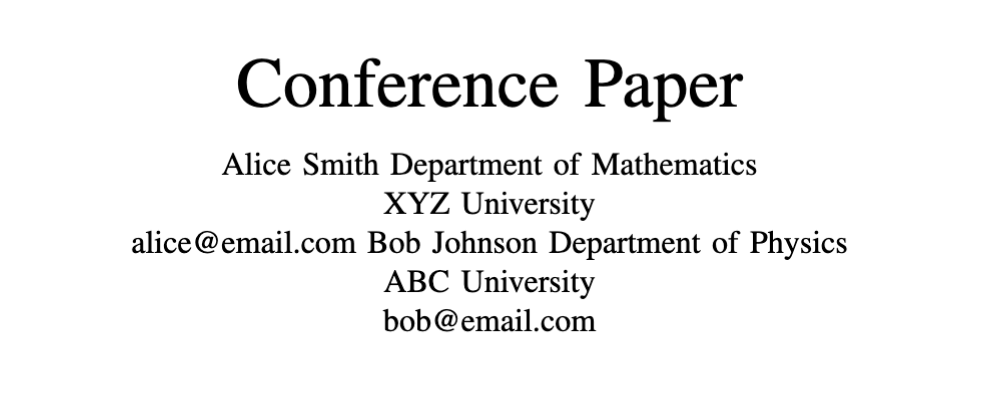
If you are submitting to an IEEE conference, this structure is not optional. It ensures everything is formatted correctly from the beginning.


