

In this guide, you’ll learn how to write for loop in LaTeX using the three most popular packages.
Table of Contents
Essential Packages for Writing Algorithms
When writing a research paper, thesis, or report, you often need to present algorithms. LaTeX provides several packages to write pseudocode in a clean, professional way. Among them, the three most widely used are:
algorithmicpackagealgorithm2epackagealgpseudocodepackage (part of algorithmicx)
In this tutorial, you’ll see for loop and nested loop examples with each package.
The algorithmic package
In this package, you can write a loop using the commands \FOR ... \ENDFOR.
\FOR{$i = 1$ to $10$}
  \STATE Print $i$
\ENDFOR
\FOR{...}-
Inside the braces, you specify the loop condition.
For example:i = 1 \; to \; 10means thatiwill run from 1 to 10. \STATE-
Represents an action or a single step in the algorithm.
Example:\State Print(i)prints the value ofi. \ENDFOR-
Marks the end of the loop. It works the same way as curly braces
{ }in programming languages.
\documentclass{article}
\usepackage{algorithm}
\usepackage{algorithmic}

\begin{document}

\begin{algorithm}
\caption{Simple for loop Example}
\begin{algorithmic}
\FOR{$i = 1$ to $10$}
  \STATE Print $i$
\ENDFOR
\end{algorithmic}
\end{algorithm}

\end{document}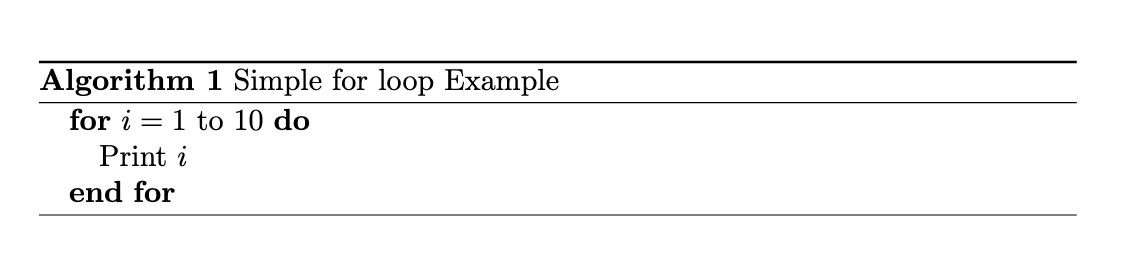
The algorithm2e package
This one is very popular because its syntax looks almost exactly like real programming.
\For{$i \gets 1$ \KwTo $10$}{
  Print $i$\;
}
\For{...}{...}-
The first
{...}defines the loop condition (what the loop runs over), and the second{...}contains the actual body of the loop. $i \gets 1$-
This means i starts from 1. (Here,
\getsis a neat symbol for assignment.) \KwTo- This means “to,” indicating the range. So the loop continues up to 10.
\;- This is used at the end of each line, just like a semicolon in programming.
\documentclass{article}
\usepackage[linesnumbered,ruled,vlined]{algorithm2e}

\begin{document}

\begin{algorithm}
\caption{Example with Algorithm2e}
\For{$i \gets 1$ \KwTo $10$}{
  Print $i$\;
}
\end{algorithm}

\end{document}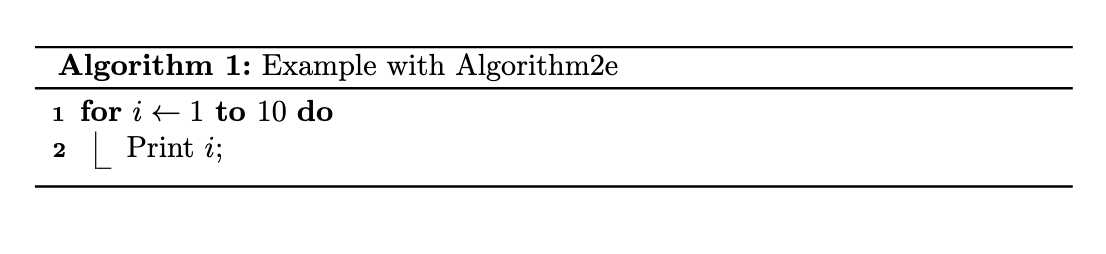
The algpseudocode package
This package is actually a part of algorithmicx. The code written with it looks much more readable and easy to follow.
\For{$i = 1$ to $10$}
  \State Print $i$
\EndFor
\For{...}-
This starts the for loop. Here, the condition is written as
$i = 1$ to $10$. \State- This is used to describe what action will be performed inside the loop.
\EndFor- This marks the end of the loop.
\documentclass{article}
\usepackage{algorithm}
\usepackage{algpseudocode}

\begin{document}

\begin{algorithm}
\caption{Example with Algpseudocode}
\begin{algorithmic}
\For{$i = 1$ to $10$}
  \State Print $i$
\EndFor
\end{algorithmic}
\end{algorithm}

\end{document}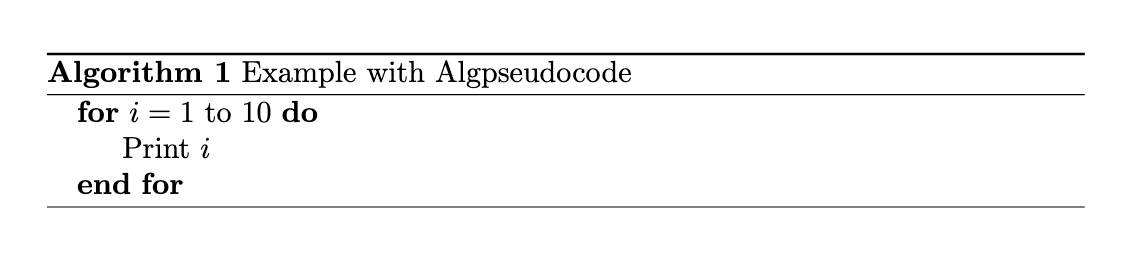
Nested for Loop Example
A nested loop means running one loop inside another. I’m showing you the syntax of nested loops using three different LaTeX algorithm packages.
% Algorithmic
\FOR{$i = 1$ to $3$}
  \FOR{$j = 1$ to $2$}
    \STATE Print $i, j$
  \ENDFOR
\ENDFOR

% Algorithm2e
\For{$i \gets 1$ \KwTo $3$}{
  \For{$j \gets 1$ \KwTo $2$}{
    Print $i, j$\;
  }
}

% Algpseudocode
\For{$i = 1$ to $3$}
  \For{$j = 1$ to $2$}
    \State Print $i, j$
  \EndFor
\EndFor
Final Note
If you want your research paper/thesis to look professional, pick algorithm2e or algpseudocode. Always keep formatting consistent and avoid mixing packages.


Jidan
LaTeX enthusiast and physics educator who enjoys explaining mathematical typesetting and scientific writing in a simple way. Writes tutorials to help students and beginners understand LaTeX more easily.