

LaTeX is an amazing language that helps us create clean and beautiful documents, especially when it comes to writing mathematical equations, symbols, and theorems.
But what if you want to add a little color? Maybe you want to highlight certain parts or make them stand out.
In this guide, we’ll walk through how to color math symbols in LaTeX, what packages you need, and the different ways you can apply color. Ready to get started? Let’s dive in together!
Table of Contents
Required xcolor Package
To color text or math expressions in LaTeX, the main thing you need is the xcolor package. It’s more powerful than the older color package because it supports color blending, custom colors, and lots of pre-defined themes.
You just need to include this package in your preamble.
\usepackage{xcolor}
Using \textcolor to Color Specific Math Symbols
The \textcolor{colorname}{...} is the easiest and most common way to add color. You can use it inside inline math $...$ or display math \[...\] environments.
\documentclass{article}
\usepackage{xcolor}
\begin{document}

This is inline math equation: $ \textcolor{red}{\alpha^2 + \beta^2} = \textcolor{blue}{\gamma^2} $
\[\textcolor{blue}{\sum_{i=1}^n i = \frac{n(n+1)}{2}} \]

\[ R_{\textcolor{red}{{\mu\nu}}} - \frac{1}{2}g_{\mu\nu}R + g_{\textcolor{red}{{\mu\nu}}}\Lambda = \frac{8\textcolor{blue}{\pi} G}{c^4}T_{\textcolor{red}{{\mu\nu}}} \]

\end{document}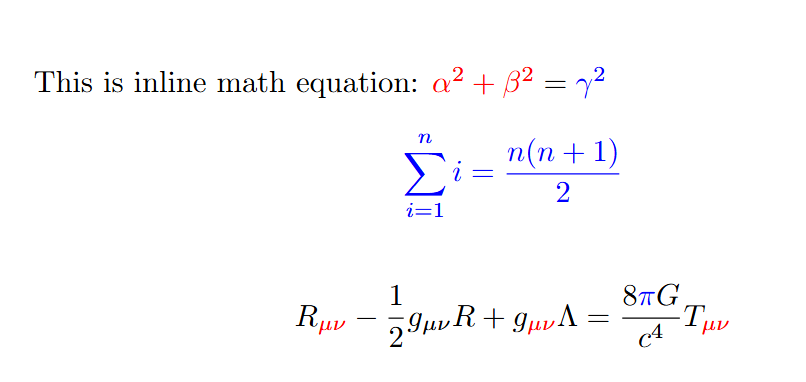
Coloring a Block with \color{}
The \color{colorname} comamnd changes the color for everything that follows until the block ends. It’s useful for applying color to an entire math expression or paragraph.
\documentclass{article}
\usepackage{xcolor,amsmath}
\begin{document}
{
\color{blue}
\begin{align*}
    &z = a + bi, \\
    &\text{where } i = \sqrt{-1}, \\
    &\text{Complex multiplication: } (a+bi)(c+di) \\
    &\text{Conjugate: } \overline{z} = a - bi, \\
    &\text{Modulus: } |z| = \sqrt{a^2 + b^2}
\end{align*}
}
\end{document}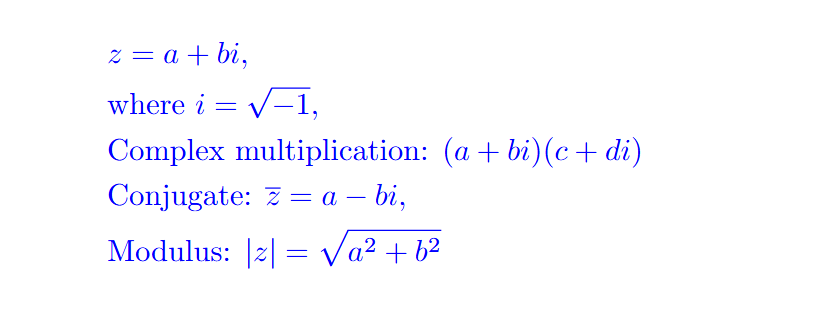
Using \colorbox for Background Color
Want to give a colored background to your math symbols? Use \colorbox{color}{...}.
\documentclass{article}
\usepackage{xcolor}
\begin{document}
\[ R_{\textcolor{red}{{\mu\nu}}} - \frac{1}{2}g_{\mu\nu}R + g_{\textcolor{red}{{\mu\nu}}}\Lambda = \frac{8\textcolor{blue}{\pi} G}{c^4}T_{\textcolor{red}{{\mu\nu}}} \]
\end{document}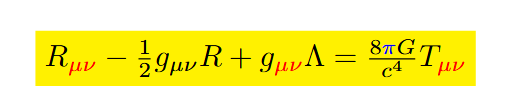
In today’s guide, we learned how to color math symbols in LaTeX. To put it simply, by using a few helpful commands and a special package, you can easily add color to your equations.
It’s not just about making things look pretty, it also helps make the math easier to read and understand.


Hi,
My question is about the color of the text following %
This text is genarally a short comment, not to be printed
In my new version of Latex, the color is grey instead of red in the previous one
How can I come back to red for the text following %
?
Thanks
This is an issue with the code highlighting. The editor you’re using has changed its theme or color settings. You can go to the editor’s settings → syntax highlighting or theme → comments section, and select red again to fix it. Let me know which editor you are using, and I can guide you step by step.