

When working with LaTeX, adding the degree symbol might seem tricky at first since LaTeX doesn’t have a built-in command for it.
However, don’t worry! There are several easy ways to include the degree symbol in your LaTeX documents, whether you are writing a simple math problem, a scientific paper, or anything in between.
Basic way (Without any extra package)
LaTeX doesn’t have a direct command for the degree symbol, but you can create one using a superscript. This method is simple and works in both text and math modes.
\documentclass{article}
\begin{document}
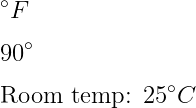
  \[ ^\circ F \]
  \[ 90^\circ \]
  Room temperature : 25 $ ^\circ C $
\end{document}
Output :
Create your own command
To avoid typing ^\circ repeatedly, you can define a custom command. This makes your LaTeX code cleaner and easier to read, especially in long documents.
\documentclass{article}
\newcommand{\degree}[1]{${#1}^\circ$}
\begin{document}
  \degree{90} \\
  Right angle: \degree{90}
\end{document}
Output :
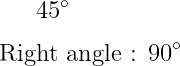
If you look at the code above, you will understand that you need to use the \newcommand to convert a ^\circ syntax to a degree command. And must pass \degree and ^\circ as arguments within the \newcommand command.
Some LaTeX packages have ready-made commands for the degree symbol. These packages simplify the process and provide additional functionality.
Using the textcomp package
Use the \textdegree command from the textcomp package. Note that it only works in normal text mode, not in math mode.
\documentclass{article}
\usepackage{textcomp}
\begin{document}
  \textdegree C
  Now temperature : 38 \textdegree C
\end{document}
Output :
      °C
Now temperature : 38 °C
Use gensymb package for the degree symbol
The gensymb package contains \degree commands to represent degree symbols.
\documentclass{article}
\usepackage{gensymb}
\begin{document}
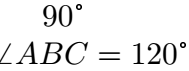
  90 \degree \\
  $ angle{ABC} = 120 \degree $
\end{document}
Output :
Use siunitx package for degree symbols
The siunitx package contains \ang command to denote the measurement of angles and in which the magnitude of the angle must be passed as an argument. So, look at this latex program below
\documentclass{article}
\usepackage{siunitx}
\begin{document}
  \[ \angle{ABC}=\ang{90} \]
  \[ \angle{PQR}=\ang{120} \]
\end{document}
Output :
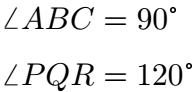
And if you pass any string in the \ang command, it will show a syntax error. That is, you cannot pass any data type other than the number into the \ang command.


Jidan
LaTeX enthusiast and physics educator who enjoys explaining mathematical typesetting and scientific writing in a simple way. Writes tutorials to help students and beginners understand LaTeX more easily.