

When writing mathematical expressions in LaTeX, you may need to display the symbol ⌊x⌋, which represents an integer rounding operation used widely in mathematics. Many beginners expect a direct command like \floor{x}, but LaTeX does not provide such a built-in command.
Table of Contents
In this guide, you will learn how to write the ⌊x⌋ notation in LaTeX, create reusable commands, adjust bracket sizes for large expressions, and define flexible delimiters using the mathtools package.
Writing ⌊x⌋ brackets in LaTeX
In LaTeX, the ⌊ ⌋ brackets are produced using the commands:
\lfloor x \rfloor
These commands create the left and right delimiters.
\documentclass{article}
\begin{document}
 \[ \lfloor x \rfloor \]
 \[ \lfloor x^{2} \rfloor \]
 \[ \lfloor \frac{1}{x} \rfloor \]
\end{document}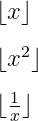
The above LaTeX code will display brackets around the variable x, its square, and the fraction 1/x.
Creating a custom command for ⌊x⌋ brackets
If you frequently use this notation, typing \lfloor and \rfloor repeatedly can make your code longer. A better solution is to define a custom command.
\documentclass{article}
\newcommand{\fl}[1]{\lfloor #1 \rfloor}
\begin{document}
  \[ \fl{x} \]
  \[ \fl{x^2} \]
  \[ \fl{\frac{1}{x}} \]
\end{document}
With this custom \fl command, you can now represent this symbol simply by typing \fl{x}
Automatically resizing ⌊ ⌋ brackets
When the expression inside the brackets becomes larger (for example fractions or complex formulas), the delimiters may appear too small. In such cases, LaTeX provides dynamic sizing using:
\left \lfloor \right \rfloor
\documentclass{article}
\begin{document}
  \[ \left \lfloor \frac{1}{x} \right \rfloor \]
  \[ \left \lfloor \frac{1}{x^2} \right \rfloor \]
  \[ \left \lfloor \frac{1}{x+1} \right \rfloor \]
\end{document}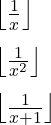
In this example, the size of the floor brackets adjusts according to the size of the fraction inside them.
If you frequently work with large expressions inside the floor symbol, you can save even more time by creating a custom command that automatically adjusts the size of the brackets.
\documentclass{article}
\newcommand{\fl}[1]{\left \lfloor #1 \right \rfloor}
\begin{document}
  \[ \fl{\frac{1}{x}} \]
  \[ \fl{\frac{1}{x^2}} \]
  \[ \fl{\frac{1}{x+1}} \]
\end{document}
Using fixed-size delimiters
LaTeX also allows manual control over delimiter sizes using commands like:
\big
\Big
\bigg
\Bigg
\documentclass{article}
\begin{document}
  \[ \Bigg \lfloor \bigg \lfloor \Big \lfloor \big \lfloor x \big \rfloor \Big \rfloor \bigg \rfloor \Bigg \rfloor \]
\end{document}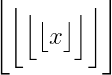
These commands allow you to manually adjust the bracket size. However, they do not automatically adapt to the content inside the expression.
For most cases, dynamic delimiters using \left and \right produce better results.
Defining delimiters using the mathtools package
For more flexibility, the mathtools package allows you to define paired delimiters in a very clean way.
\documentclass{article}
\usepackage{mathtools}
\DeclarePairedDelimiter\fl{\lfloor}{\rfloor}
\begin{document}
  \[ \fl{x} \; \fl{\frac{x}{y}} \; \fl{\frac{\floor{x}}{x}} \]
  \[ \fl*{x} \; \fl*{\frac{x}{y}} \; \fl*{\frac{\fl*{x}}{x}} \]
\end{document}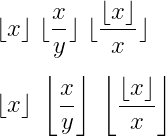
The \fl* command is especially handy when you need the brackets to adjust dynamically based on the contents.
Writing the floor() function
Often, when writing a mathematical document, you’ll want to refer to the floor function itself, like floor(x). While you could just write it as plain text, this isn’t the best approach in LaTeX.
Instead, you should use either the \mathrm{} or \mbox{} commands to format the function correctly.
\documentclass{article}
\begin{document}
Returns the largest integer less than or equal to a given number. For example, if \mbox{x = 3.7}, then the output of \mbox{floor(3.7)} is 3.
 \[ \mathrm{floor}(3.7) = 3 \]
If we consider a negative value, such as \mbox{x = -2.5}, the \mbox{floor(-2.5)} function will return the largest integer less than or equal to -2.5, which is -3.
 \[ \mathrm{floor}(-2.5) = -3 \]
\end{document}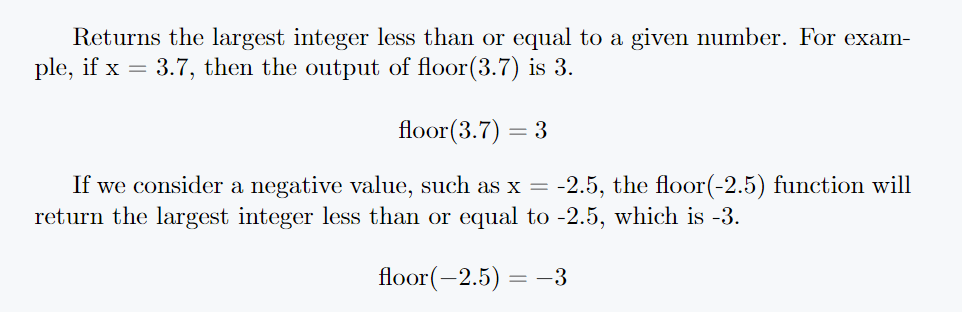
FAQs
How do you represent a floor symbol with LaTeX?
There is no individual command for the floor symbol in latex. However, there are \lfloor and \rfloor commands to represent the two brackets of the floor symbol.
How do you represent a big floor symbol in LaTeX?
For the big floor symbol you need to use the \left and \right commands before the \lfloor and \rfloor commands.
What other ways can a floor symbol be represented?
You can take the help of different packages in addition to the default command in latex. However, the same command is present in each package.
Summary
The ⌊x⌋ bracket notation can be easily written in LaTeX using the commands \lfloor and \rfloor. While simple expressions work well with basic delimiters, larger formulas often require dynamic resizing using \left and \right.
For more advanced documents, defining custom commands or using the mathtools package can make your LaTeX code more organized and efficient.


Jidan
LaTeX enthusiast and physics educator who enjoys explaining mathematical typesetting and scientific writing in a simple way. Writes tutorials to help students and beginners understand LaTeX more easily.