

This tutorial explains how to use the gradient operator in LaTeX.
The gradient operator is represented by the nabla (∇) symbol and is usually expressed using partial derivatives.
\[ \nabla \]
\[ \nabla =\frac{\partial }{\partial x}\hat{\imath} + \frac{\partial }{\partial y}\hat{\jmath} +\frac{\partial }{\partial k}\hat{z} \]
Output :
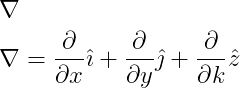
It is better to use \imath and \jmath instead of i and j to remove the dots and match the z unit vector.
For a function f, its gradient is:
\[ \nabla f = grad \: \textit{f} \]
\[ \nabla f=\frac{\partial f}{\partial x}\hat{\imath} + \frac{\partial f}{\partial y}\hat{\jmath} +\frac{\partial f}{\partial k}\hat{z} \]
\end{document}
Output :
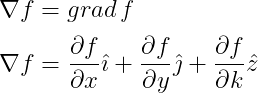
To simplify these steps, use the physics package, which is recommended for working with grad operators.
Using the Physics Package for the grad command
In the physics package, the gradient operator is defined using the \gradient command, with \grad as its shorthand.
\documentclass{article}
\usepackage{physics}
\begin{document}
  \[ \grad F(x,y,z)\]
\end{document}
Output :
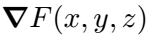
The gradient operator is a vector, meaning the nabla (∇) symbol can be written with a vector arrow above it without making it bold.
\documentclass{article}
\usepackage[arrowdel]{physics}
\begin{document}
 \[ \grad f \]
\end{document}
Output :

In the code above, arrowdel is used as an optional argument in the physics package to add a vector arrow.


Jidan
LaTeX enthusiast and physics educator who enjoys explaining mathematical typesetting and scientific writing in a simple way. Writes tutorials to help students and beginners understand LaTeX more easily.