

Mathematically, several symbols can represent “greater than or equal to,” but the ≥ symbol is used in 99% of cases, and LaTeX provides the default command \geq for it.
\documentclass{article}
\begin{document}
  \[ a \geq b \]
  \[ p \geq q \]
\end{document}
Output :

Alternative “Greater Than or Equal To” Symbols
Beyond the standard \geq command, LaTeX offers several variations of the ≥ symbol. To access these, you’ll need the amsmath and mathabx packages.
\documentclass{article}
\usepackage{amsmath,mathabx}
\begin{document}
  \[ p \eqslantgtr q \]
  \[ p \geqslant q \]
  \[ p \geqq q \]
  \[ p \gtreqless q \]
\end{document}
Output :
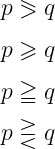
Each of these symbols provides slight variations in formatting, useful for different mathematical notations.
Negating “Greater Than or Equal To” Symbols
If you need the “not greater than or equal to” versions of these symbols, LaTeX allows you to combine the “not” symbol with each variation.
\documentclass{article}
\usepackage{amsmath,mathabx}
\begin{document}
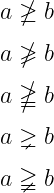
  \[ a \ngeq b \]
  \[ a \ngeqslant b \]
  \[ a \ngeqq b \]
  \[ a \gneq b \]
  \[ a \gneqq b \]
\end{document}
Output :
Final Thoughts
This tutorial has covered all variations of the “greater than or equal to” symbol in LaTeX, from the basic ≥ command (\geq) to alternative styles and their negated versions


Jidan
LaTeX enthusiast and physics educator who enjoys explaining mathematical typesetting and scientific writing in a simple way. Writes tutorials to help students and beginners understand LaTeX more easily.