

More or less we can represent the matrix with latex, no problem if we don’t know. This tutorial will cover everything from defining matrices to using them in equations.
Table of Contents
Matrix equation with amsmath package
amsmath is a popular latex package. which is most commonly used to represent mathematical expressions. And in case of matrix also this package will be requirement.
Each environment can define matrices with different delimiters or no delimiters at all. Here are the basic types:
matrix (no delimiter)
pmatrix (parentheses)
bmatrix (brackets)
Bmatrix (braces)
vmatrix (vertical bars)
Vmatrix (double vertical bars)
You can simply place the matrix environment of your choice within an equation environment. Here’s an example of a matrix equation using the pmatrix environment
\documentclass{article}
\usepackage{amsmath}
\begin{document}

\[
\text{pmatrix : } \begin{pmatrix} a & b \\ c & d \end{pmatrix}, \quad
\text{bmatrix : } \begin{bmatrix} a & b \\ c & d \end{bmatrix}, \quad
\text{Bmatrix : } \begin{Bmatrix} a & b \\ c & d \end{Bmatrix}
\]

\[
\text{vmatrix : } \begin{vmatrix} a & b \\ c & d \end{vmatrix}, \quad
\text{Vmatrix : } \begin{Vmatrix} a & b \\ c & d \end{Vmatrix}
\]

\begin{align}
A &= \begin{pmatrix}
1 & 2 \\
3 & 4 \\
\end{pmatrix}, \quad
B = \begin{pmatrix}
5 & 6 \\
7 & 8 \\
\end{pmatrix} \\[5pt]
A + B &= \begin{pmatrix}
1+5 & 2+6 \\
3+7 & 4+8 \\
\end{pmatrix}
= \begin{pmatrix}
6 & 8 \\
10 & 12 \\
\end{pmatrix}
\end{align}

\end{document}
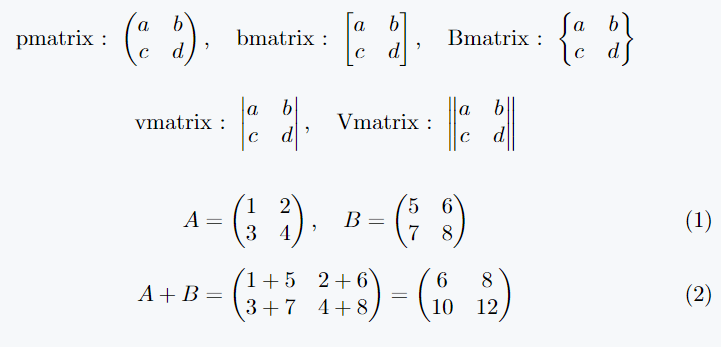
Matrix equation with array environment
The array environment offers another way to create matrices, especially when you need more control over column alignment and spacing. This method requires manual delimiter addition.
\documentclass{article}
\usepackage{amsmath}
\begin{document}
\begin{align*}
\left[  \begin{array}{ccc}
a_{11} & a_{12} & a_{13} \\
a_{21} & a_{22} & a_{23} \\
\end{array} \right]
+
\left[ \begin{array}{ccc}
b_{11} & b_{12} & b_{13} \\
b_{21} & b_{22} & b_{23} \\
\end{array} \right] \\[3pt]
=
\left[ \begin{array}{ccc}
a_{11}+b_{11} & a_{12}+b_{12} & a_{13}+b_{13} \\
a_{21}+b_{21} & a_{22}+b_{22} & a_{23}+b_{23} \\
\end{array} \right]
\end{align*}
\end{document}
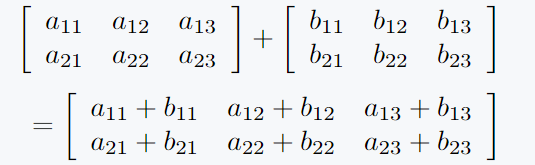
Matrices are constructed using array environment enclosed within \left[ and \right] to manually add brackets around the matrices.
This method gives you the freedom to specify the column alignment (e.g., {ccc} for three centered columns).
Use physics package
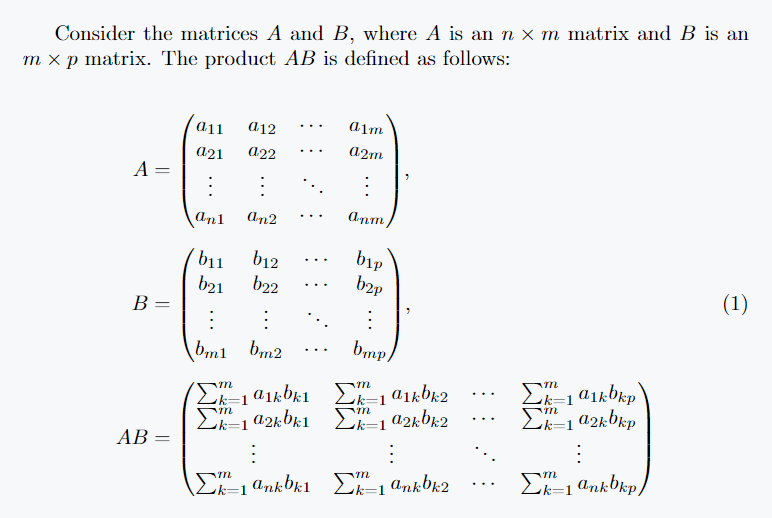
There are \mqty commands for representing matrices provided by the physics package.
This command allows for easy inclusion of different types of delimiters:
Parentheses ( ) – by using \mqty(...).
Square brackets [ ] – by using \mqty[...].
Vertical bars | | – for determinants by using \vmqty|...|.
For matrices, you simply need to pass elements of matrix to the \mqty command, using & to separate elements in the same row and \\ to indicate a new row.
\documentclass{article}
\usepackage{amsmath}
\begin{document}
Consider the matrices \(A\) and \(B\), where \(A\) is an \(n \times m\) matrix and \(B\) is an \(m \times p\) matrix. The product \(AB\) is defined as follows:

\begin{equation}
\begin{split}
A &= \mqty(a_{11} & a_{12} & \cdots & a_{1m} \\
           a_{21} & a_{22} & \cdots & a_{2m} \\
           \vdots & \vdots & \ddots & \vdots \\
           a_{n1} & a_{n2} & \cdots & a_{nm}), \\[5pt]
B &= \mqty(b_{11} & b_{12} & \cdots & b_{1p} \\
           b_{21} & b_{22} & \cdots & b_{2p} \\
           \vdots & \vdots & \ddots & \vdots \\
           b_{m1} & b_{m2} & \cdots & b_{mp}), \\[5pt]
AB &= \mqty(\sum_{k=1}^{m} a_{1k}b_{k1} & \sum_{k=1}^{m} a_{1k}b_{k2} & \cdots & \sum_{k=1}^{m} a_{1k}b_{kp} \\
            \sum_{k=1}^{m} a_{2k}b_{k1} & \sum_{k=1}^{m} a_{2k}b_{k2} & \cdots & \sum_{k=1}^{m} a_{2k}b_{kp} \\
            \vdots & \vdots & \ddots & \vdots \\
            \sum_{k=1}^{m} a_{nk}b_{k1} & \sum_{k=1}^{m} a_{nk}b_{k2} & \cdots & \sum_{k=1}^{m} a_{nk}b_{kp})
\end{split}
\end{equation}

\end{document}


Jidan
LaTeX enthusiast and physics educator who enjoys explaining mathematical typesetting and scientific writing in a simple way. Writes tutorials to help students and beginners understand LaTeX more easily.