

It is common to see an error in LaTeX when typing “_” in normal text. The reason is that the underscore symbol is reserved for subscripts in mathematical expressions.
Because of this, users often face issues when writing technical terms, file names, or variables such as m_n.
Table of Contents
Printing an Underscore in Math Mode
LaTeX provides a built-in command \textunderscore that prints the “_” character safely in normal text.
You can also display it by escaping the symbol using \_. Sometimes it is written as {\_} to keep the formatting stable inside text.
\textunderscore
\_
\documentclass{article}
\begin{document}
 \[ \_ Underscore \_ \]
 \[ One{\_} Two{\_} Three \]
 \[ \Lambda \textunderscore 0 \rightarrow \Lambda_0 \]
 \[ Underscore{\_} in \ math{\_} mode \]
\end{document}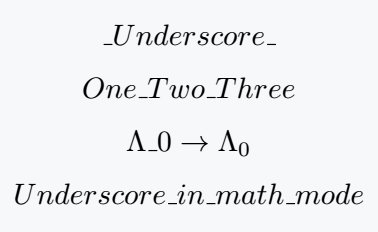
Using an Underscore in Text Mode
The same commands can also be used in text mode. Both \textunderscore and {\_} allow you to print the “_” character safely inside normal text.
\documentclass{article}
\begin{document}
  \textunderscore Underscore\textunderscore\\[4pt]
  One{\_} Two{\_} Three\\[4pt]
  $\Lambda$\textunderscore 0 $\rightarrow$ $\Lambda_0$\\[4pt]
  Underscore{\_} in\textunderscore text{\_} mode
\end{document}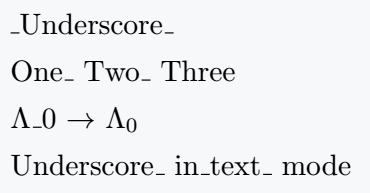
Another Way to Print an Underscore
LaTeX also provides a default command called \verb|...|. This command prints characters or commands exactly as written, without compiling them.
You simply place the content between |...|. However, the output appears in a slightly different monospaced font style.
This command works in both text mode and math mode.
\documentclass{article}
\begin{document}
   \verb|_Underscore_|\\[4pt]
   \verb|One_Two_Three|\\[4pt]
   \verb|\Lambda_0| $\rightarrow$ $\Lambda_0$\\[4pt]
   \verb|Underscore_in_text_mode|\\[4pt]
\end{document}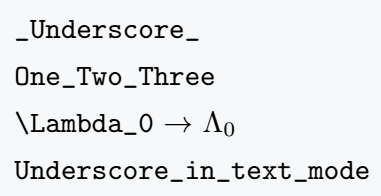
Conclusion
In LaTeX, the underscore plays an important role in creating subscripts, which is why it cannot be typed directly in normal text.
To display the underscore symbol correctly, you can use commands like \_, \textunderscore, or \verb.


Jidan
LaTeX enthusiast and physics educator who enjoys explaining mathematical typesetting and scientific writing in a simple way. Writes tutorials to help students and beginners understand LaTeX more easily.