

Derivatives are one of the most frequently used symbols in mathematics, physics, and engineering. In LaTeX, there are several ways to represent them.
From simple manual methods using \frac to advanced and flexible solutions using packages like physics and derivative.
Table of Contents
Using Default \frac Command
The most basic way to write a derivative in LaTeX is to use the \frac command with differentials in the numerator and denominator. This method does not require any external package.
\mathrm{d}
\frac{arg1}{arg2}
- \mathrm{d}
- Used to write the differential symbol (like d) in an upright (roman) font rather than italic math font for proper typographic convention.
- \frac{arg1}{arg2}
- Creates a fraction with arg1 as numerator and arg2 as denominator. For example,
\frac{dx}{dt}produces the basic derivative format.
\documentclass{article}
\begin{document}
  \[ {dx},\mathrm{d}y, \mathrm{d}z \]
  \[ \frac{dx}{dt}, \frac{\mathrm{df}}{dy}, \frac{\mathrm{d}}{\mathrm{d}z}f(z) \]
  \[ \frac{\mathrm{d}}{\mathrm{d}t}, \frac{\mathrm{d^2}}{\mathrm{d}t^2}, \frac{\mathrm{d^3}}{\mathrm{d}t^3} \]
\end{document}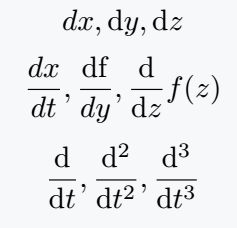
Using \frac repeatedly can make your LaTeX code unnecessarily long and less readable, especially when dealing with higher-order derivatives.
That’s why specialized packages like physics and derivative have been created to simplify the syntax.
Using physics Package
The physics package includes a very convenient \dv command to typeset derivatives in a cleaner and more consistent way.
It automatically formats the differential terms correctly and supports higher-order derivatives too.
\dv{arg}
\dd[order]{arg}
\dv{arg1}{arg2}
\dv*{arg1}{arg2}
\dv[order]{arg1}{arg2}
- \dd
- Typesets the differential operator “d” properly in roman font and supports optional order arguments like
\dd[3]{x}. - \dv{f}{x}
- Represents the derivative of f with respect to x. The
\dvcommand automatically adds the correct spacing and fraction layout. - \dv[3]{f}{y}
- Produces the third derivative of f with respect to y, e.g. d³f/dy³.
- \dv*{f}{y}
- The starred version
\dv*produces an inline (non-fraction) derivative form, perfect for compact equations.
\documentclass{article}
\usepackage{physics}
\begin{document}
  % Use physics package for Differentials
  \[ \dd, \dd x, \dd{x}, \dd[3]{x}, \dd(\sin\theta) \]
  \[ \dv{y}, \dv{f}{y}, \dv[3]{f}{y} \]
  \[ \dv{x}(\frac{1}{x^c}) \]
  % Inline form for text mode
  \[ \dv*{f}{y} \]
\end{document}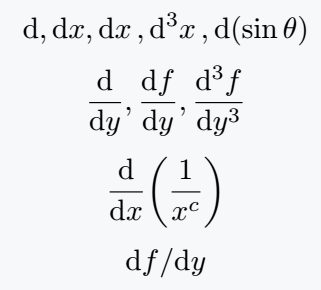
Using derivative Package
The derivative package provides a more powerful and customizable way to write derivatives and differentials.
It is especially useful when working with multivariable calculus or higher-order derivatives.
\odif{arg1,arg2,arg3}
\odif*{arg1,arg2,arg3}
\odif[order={order1,order2,order3,..}]{arg1,arg2,arg3,..}
\odv[order={value}]{arg1}{arg2}
- \odif
- Prints differentials, such as dx, dy, dz. Multiple arguments print multiple differentials together.
- \odif*
- Produces compact inline output for differentials, useful inside text or tight formulas.
- [order={…}]
- Specifies the order of each derivative. For instance,
\odif[order={1,2,3}]{x,y,z}produces first, second, and third differentials respectively. - \odv
- Prints ordinary derivatives similar to
\dvfrom the physics package, but with enhanced customization options.
\documentclass{article}
\usepackage{derivative}
\begin{document}
   % Use derivative package for Differentials
   \[ \odif{x}, \odif{y}, \odif{z} \]
   \[ \odif{x,y,z} \]
   \[ \odif*{x,y,z} \]
   \[ \odif[order={1,2,3}]{x,y,z} \]
   \[ \odv{y}{x}, \odv[order={2}]{x}{t}, \odv[order={n}]{y}{z} $
\end{document}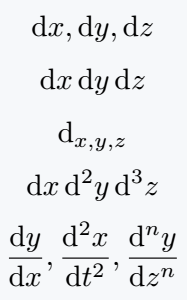
Using Partial Derivatives
For partial derivatives, LaTeX provides the \partial command by default.
However, with the physics or derivative package, you can use \pdv which is more convenient and visually consistent.
\pdv{arg}
\pdv{arg1}{arg2}{arg3}
\pdv*{arg1}{arg2}
\pdv[order={order1,order2,order3,..}]{arg1}{arg1,arg2,arg3,..}
- \pdv
- Represents the partial derivative of a function. For example,
\pdv{f}{x}gives ∂f/∂x. - \pdv*{f}{x}
- Gives the inline (non-fractional) form of the derivative, useful for text mode equations.
- \pdv{f}{x}{y}
- Displays a second-order mixed partial derivative, e.g., ∂²f/(∂x∂y).
- [order={…}]
- Allows you to specify derivative orders for multiple variables, like
\pdv[order={i,j,k}]{f}{x,y,z}.
\documentclass{article}
\usepackage{derivative}
\begin{document}
   \[ \pdv[order={i,j,k}]{f}{x,y,z} \]
   \[ \pdv[order={2,3,4}]{f}{x,y,z} \]
   \[ \pdv*{f}{x,y} \]
   \[ \pdv{f(x,y,z)}{x}(17,u+v,v^2) \]
   \[ \pdv{f}{x}_{y,z},\; \pdv{f}{x,y}^{(x_2,y_2)}_{(x_1,y_1)} \]
   \[ \nabla f(a)=\left(\pdv{f}{x_1}(a),\cdots,\pdv{f}{x_n}(a) \right) \]
   \[ \nabla = \sum_{j=1}^n\left[\pdv{}{x_j} \right]\hat{e}_j \]
\end{document}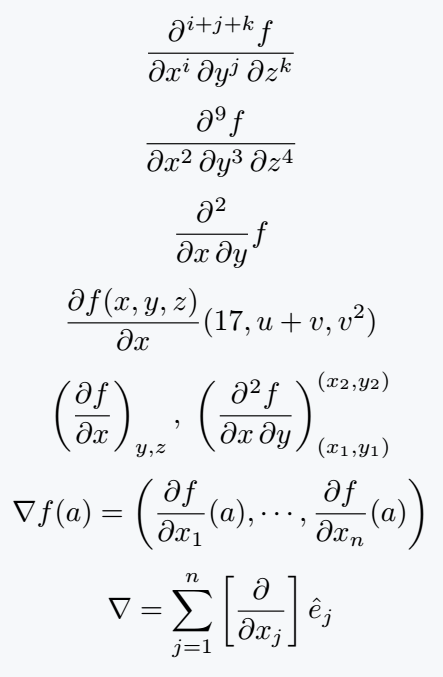
Dot Derivatives
There is no special package or command for dot or time derivative, manually represented below.
\dot{arg}
\ddot{arg}
\dddot{arg}
- \dot{v}
- Represents the first time derivative of v (velocity).
- \ddot{v}
- Represents the second time derivative (acceleration).
- \dddot{v}
- Represents the third time derivative (jerk or jounce), available via the physics package.
\documentclass{article}
\usepackage{physics}
\begin{document}
   % \dot and \ddot is a default command in latex
   \[ \dv{v}{t} = \dot{v} \]
   \[ \dv[2]{v}{t} = \ddot{v} \]
   % \dddot is a physics package's command
   \[ \dv[3]{v}{t} = \dddot{v} \]
\end{document}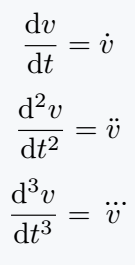
Evaluated Bar Notation
The \eval command from the physics package is used to evaluate derivatives at a specific value of the variable. It simplifies writing long evaluation expressions neatly.
\eval{exp}_{arg1}^{arg2}
- \eval{exp}
- The expression inside
\evalis evaluated after differentiation. - _{arg1}^{arg2}
- Represents the lower and upper evaluation limits. Often used as
_{x=0}to evaluate at x=0.
\documentclass{article}
\usepackage{physics}
\begin{document}
   \[ \eval{\pdv{f}{x}}_{x=0} \]
   \[ \eval{\pdv[2]{f}{x}}_{x=0} \]
   \[ \eval{\pdv[3]{f}{x}}_{x=0} \]
   \[ \eval{\pdv[n]{f}{x}}_{x=0} \]
\end{document}
Best Practice
If you only need simple derivatives, use \frac directly.
For advanced documents, use \dv and \pdv from the physics package, they are efficient and readable.
If your project involves high-order or multi-variable derivatives, the derivative package is best due to its extended flexibility and optional arguments.


Jidan
LaTeX enthusiast and physics educator who enjoys explaining mathematical typesetting and scientific writing in a simple way. Writes tutorials to help students and beginners understand LaTeX more easily.